


Schedule a Call

Designing Clean, User-Friendly & Conversion-Focused Digital Experiences

At Magestix Solutions, we design modern, user-friendly, and business-focused digital interfaces for websites, mobile apps, dashboards, web applications, e-commerce platforms, SaaS products, and landing pages.
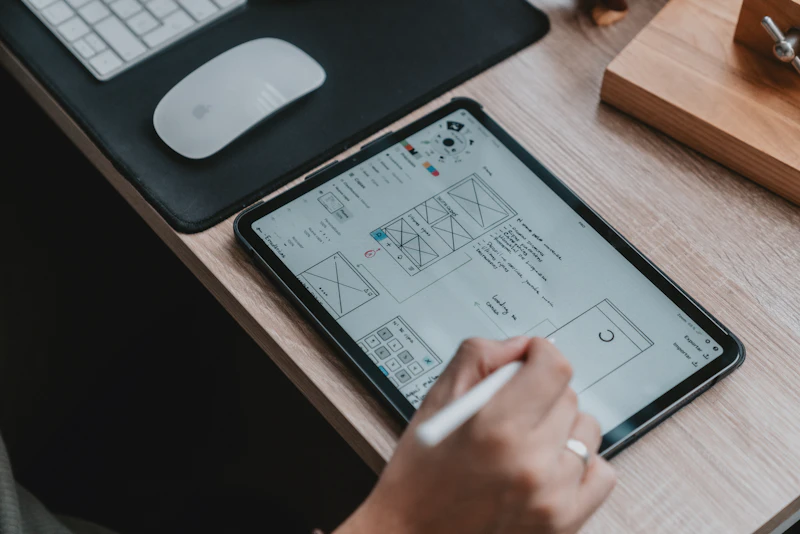
Frame: Dashboard Mockup
UI UX Design Workspace
W: 1280 H: 960

We Design Digital Products That Users Can
Understand, Trust & Use Easily

A successful digital product is not only about attractive visuals. It should be easy to understand, simple to navigate, clear in structure, and smooth to use. UI/UX design helps turn an idea into a practical digital experience.

Start a Project
01

User-Centered Experience

We design around user behaviors to minimize checkout or signup friction and make every interaction feel natural.

02

Modern Interface Design

Clean, professional, and visually balanced layout systems that match your brand identity across all devices.

03

Business-Focused UX

User paths planned to support lead generation, conversions, inquiries, and measurable business outcomes.

What Makes UI and UX Different?

UI and UX work together, but both have different purposes to make a digital product successful.

UI Design (User Interface)

UI = How it looks

UI focuses on the digital product's aesthetics, visuals, and interactive elements. It establishes the look, feel, and brand personality.

  • Color palettes, styling, and visual theme
  • Typography systems (fonts, spacing, sizes)
  • Buttons, input forms, checkout elements
  • Iconography, mockups, images, and card layouts
UX Design (User Experience)

UX = How it works

UX focuses on the logic, flow, ease of navigation, and structure. It ensures users find information and perform actions without struggle.

  • User research, interviews, and competitor review
  • Information architecture (IA) & navigation hierarchy
  • Interaction details, empty states, and feedback curves
  • User flow mapping, wireframing, and clickable prototypes

Good UI/UX Helps Users
Stay, Understand & Take Action

Users leave websites and apps when they feel confused, lost, or uncomfortable. A strong UI/UX design helps remove friction and makes the experience simple, clear, and enjoyable.

01

Conversion Boost

Clear CTA buttons, simple form fields, and focused layouts designed to turn visitors into leads.

02

Drop-Off Reduction

Removing complex fields, useless steps, and navigation barriers so users complete checkout quickly.

03

Engagement Scale

Organized grids, clean typography scales, and visual spacing that keep visitors reading longer.

04

Developer Handoff

Figma components, style guidelines, pixel spaces, and notes structured for clean coding.

Complete UI/UX Design Solutions for Websites, Apps & Products

We provide custom UI/UX design solutions for different digital platforms. Explore our capabilities below:

Website UI Design

We design modern website interfaces with clean layouts, clear sections, strong branding, and responsive structure.

Mobile App UI Design

We design mobile app screens for Android and iOS with onboarding flows, forms, profiles, and native layouts.

Web App UI/UX Design

We design web applications with organized layouts, dashboards, data tables, filters, forms, and actions.

Dashboard UI Design

We create clean dashboards for admin panels, analytics tools, CRM systems, portals, and reporting platforms.

Landing Page UI/UX

We design landing pages focused on lead generation, service campaigns, offers, and conversion points.

E-Commerce UI/UX

We design product views, categories, search filters, carts, checkout steps, and order summaries.

SaaS Product Design

We design SaaS platforms with onboarding systems, subscriptions, settings, roles, and design systems.

Wireframing

We create low-fidelity and high-fidelity wireframes to plan visual structures before designing mockups.

Interactive Prototyping

We build clickable prototypes in Figma to demonstrate app navigation flow before coding starts.

UX Research & User Journeys

We research user behavior, study competitors, and outline optimal pathways matching target goals.

Information Architecture

We organize pages, content maps, site structures, categories, menus, and interaction patterns.

Design System Creation

We create reusable styles (colors, fonts, input forms, cards, button grids) to keep designs consistent.

UI/UX Solutions for
Every Digital Product Need

Different digital products require different design approaches. We build specialized visual environments suited to your product goals.

01

Website UI/UX Design

Designed for high-impact brand websites, marketing landing pages, and business portfolios. Clean grids, modern headers, and conversion action zones.

02

Mobile App UI/UX Design

Designed for native Android & iOS app layouts. Bottom bar menus, onboarding screens, profile tabs, interactive lists, and swipe animations.

03

Dashboard & SaaS UI Design

Designed for complex data platforms, admin portals, CRM panels, and SaaS apps. Clear sidebar navigation, search grids, and data tables.

04

E-Commerce UX Design

Designed for digital storefronts and retail platforms. Product views, add-to-cart overlays, optimized checkouts, and category filtering panels.

We Design with Research, User Behavior & Business Goals in Mind

Strong UI/UX design starts before visual layout. We plan how users will interact, what path they will follow, and what actions they will take to support your goals.

Business Goal Alignment

We outline whether the app needs signups, leads, sales, booking calls, or reporting tools.

Target User Research

We analyze who will use the interface, what they need, and what friction they want to avoid.

User Flow Planning

We map optimal pathways to complete desired steps quickly without getting lost.

Content Architecture

We organize information hierarchy so users find key labels immediately.

Competitor Audits

We research similar products to understand user habits and find branding gaps.

Conversion Mapping

We place buttons, forms, and alerts where users are most likely to click and register.

Clear Structure Makes Digital Products Easier to Use

Before final visual design, we build the content layout map and user pathways. This structure acts as the structural foundation of the digital application.

Page layout planning
Menu architecture
Content categories
User actions mapping
Signup/Checkout flows
Dashboard hierarchy

Information Architecture & User Flow

We define how data is structured and how a user flows from landing to conversion.

1. Entry & Orientation
2. Discovery & Selection
3. Checkout & Conversion

We Plan the Experience Before Final Design

Wireframes help lay down the basic structure of the interface. Prototyping connects screens to show how the app feels during action.

Wireframes Help With
  • Screen structure layout planning
  • Key sections & content placement hierarchy
  • Forms and input boxes arrangement
  • User path coordinates validation
  • Defining primary and secondary zones
Clickable Prototypes Help With
  • Clickable user flows simulation
  • Interactive transitions testing
  • Developer transition behavior explanation
  • Getting early customer usability feedback
  • Demonstrating system navigation directly

Consistent Design Makes Your Product Look Professional

We design style assets and component tokens to ensure the interface looks completely uniform across all devices and pages.

Standard color palette
Typography styles guidelines
Button grids & shapes
Input forms & checkmarks
Card containers layout
Standard spacing & grids

Design Component Tokens

We maintain clean visual rules to guarantee unified styles and smooth developer handoff.

COLOR SCHEME
TYPOGRAPHY SCALE Plus Jakarta Sans (14px - 32px)
COMPONENTS & BUTTONS Primary Button Outline Button

A Clear Process to
Design Better Digital Experiences

We follow structured checkpoints to take your idea from research to a pixel-perfect mockup ready for coding.

01

Requirement Discussion

We understand your business goals, target audience, key features, references, and platform requirements.

02

Research & User Study

We study competitor layouts, analyze target user habits, and review existing interface issues.

03

Information Architecture

We plan menu hierarchies, site structures, and page grids to group information logically.

04

User Flow Planning

We sketch path mappings showing how a visitor moves step-by-step to complete actions.

05

Wireframing

We create skeletal layouts to organize screen space, text placement, and buttons without visual clutter.

06

Visual UI Design

We apply colors, graphics, typography, icons, and modern styles to create high-fidelity mockups.

07

Prototype Creation

We connect the high-fidelity screens in Figma, building a clickable layout for visual testing.

08

Review & Revisions

We present the interactive layouts, collect your feedback, and make necessary edits to align styles.

09

Final Developer Handoff

We structure design files, coordinate parameters, export assets, and provide notes for developer support.

How UI/UX Guides Users from
First Visit to Final Action

Every click, read, and interaction is designed to lead the visitor seamlessly towards business conversions.

01
User Entry

Visitor lands on the digital platform.

02
First Impression

Clean structure, clear value headline.

03
Easy Navigation

Users find details immediately.

04
Clear Details

No visual confusion or jargon.

05
Trust Building

Testimonials & reviews visible.

06
Final Action

Inquiry, signup, or checkout completes.

From Basic Wireframe to Complete Digital Interface

We map structural layout frames before applying visual styles. This process keeps layouts highly organized and developer-friendly.

01

UX Wireframe (Structure)

Low-fidelity skeletal structures designed to organize layout grids, focus text elements, define buttons, and arrange spacing without color clutter.

02

UI High-Fidelity (Visuals)

Completed mockup styling applying brand color palettes, premium typography, modern button states, high-quality images, and exact pixel guidelines.

Why Businesses Choose
Magestix for UI/UX Design

We don't design random mockups. We create responsive, structured digital interfaces centered around business performance.

01

User-Centered

We build interfaces optimized for your target audience expectations.

02

Modern Visuals

Aesthetically balanced and clean designs matching global styling rules.

03

Business Focused

We design paths that help increase registrations, sales, and leads.

04

Clear Structure

Menus and labels organized so users never get lost.

05

Responsive Grid

Designs look clean and work properly on mobile, tablet, and desktops.

06

Interactive Prototypes

Clickable mockups are prepared to test layout logic before coding.

07

Developer Friendly

Clean Figma structures, style layers, and notes for developers.

08

Complete Support

Full digital workflow from wireframes to design system handoff.

Modern Applications For
Collaborative & High-Fidelity UI/UX

Figma UI Design Adobe XD Sketch App Adobe Photoshop Adobe Illustrator InVision Prototyping Zeplin Handoff Miro User Flow Figma UI Design Adobe XD Sketch App Adobe Photoshop Adobe Illustrator InVision Prototyping Zeplin Handoff Miro User Flow

UI/UX Design for Different
Businesses & Digital Products

Different industries need different interface styles, user flows, and digital experiences. We customize UI/UX design according to the users, platform purpose, and business goals.

Startups & MVPs
Corporate Businesses
E-Commerce Brands
Education & LMS Platforms
Real Estate Portals
Healthcare & Clinics
Finance & Trading platforms
Restaurants & Booking systems
Personal Brands & Portfolios
SaaS & Tech Products

Choose the Right UI/UX Design
Support For Your Brand

Select the package that fits your product needs. All options include professional quality and dedicated support.

01
Landing Page UI
Single landing pages with a conversion-focused layout
Final price depends on project scope.
Starting from $ 199
What's Included
  • One landing-page design
  • Basic requirement discussion
  • Low-fidelity wireframe
  • Desktop design
  • Mobile-responsive design
  • Brand colors and typography application
  • CTA and conversion-layout planning
  • Figma source file and developer handoff
Get Started
Most Popular
02
Website UI/UX
Business website UI/UX projects
Final price depends on project scope.
Starting from $ 499
What's Included
  • Up to 8 website pages
  • Requirement and competitor analysis
  • Website architecture
  • User-flow planning and wireframes
  • Desktop and mobile layouts
  • Interactive Figma prototype
  • Reusable UI components
  • Typography and color system
  • Basic design system
  • Developer handoff files
Start My Website UI/UX
03
Mobile App UI/UX
Android or iOS application interface design
Final price depends on project scope.
Starting from $ 999
What's Included
  • Up to 20 application screens
  • Requirement analysis
  • User journey and flow planning
  • Low-fidelity wireframes
  • High-fidelity UI screens
  • Splash and onboarding screens
  • Login and registration flow
  • Platform guideline alignment
  • Interactive prototype
  • Reusable components, design system and developer handoff assets
Create My App UI/UX
04
SaaS & Product Design
Dashboards, portals and complex digital products
Final price depends on project scope.
Starting from $ 1,799
What's Included
  • Product requirement workshop
  • Competitor and user analysis
  • User personas
  • Information architecture
  • Complex user-flow planning
  • Wireframes
  • Dashboard and admin-panel design
  • Responsive web layouts
  • Interactive advanced prototype
  • Component library and design system
  • Developer specifications and usability-review support
Start My Product Design

Need a custom product design package? Contact us for a tailored quote →

Information Required to
Start Your UI/UX Project

To build an accurate structure and layout, we request a few details about your business and users:

Business name & logo assets
Brand guidelines & color palettes
Platform type (website, app, portal)
List of required screens & pages
Main business conversion goals
Target audience profiles
Reference designs you like
Competitor website/app links

What You Receive After UI/UX Design Completion

After design approval, we organize and export all styling assets so developers can build code accurately without guesswork.

Layered Figma source files
Clickable prototype links
Standard typography style library
Vector assets, icons, and SVG cuts
Spacing and padding guidelines
Interactive hover states guidelines
Developer Handoff View
// TYPOGRAPHY STYLE SHEET
H1: Inter SemiBold, 36px, LineHeight 1.2
Body: Inter Regular, 15px, LineHeight 1.7
// SPACING GRID
Containers: 1200px Grid Width, 12 Columns
Padding: 24px Desktop, 16px Mobile
Handoff Specifications

Already Have a Website or App? We Can Improve Its Experience

If your current platform is not converting visitors or users struggle to complete actions, our UI/UX audit helps identify core design issues and outlines improvements.

Navigation leaks audit
Form friction reduction
Visual hierarchy check
Call-To-Action optimization
Audit Flowchart
1. Analyze Existing Product
2. Pinpoint Conversion Barriers
3. Apply Redesign Direction
Audit Process

Frequently Asked Questions

What is UI/UX design?
UI (User Interface) design focuses on the digital product's look and visual styling (colors, typography, cards, button shapes). UX (User Experience) design focuses on the logic, flow, wireframing, and structure, ensuring the application is easy to understand and navigate.
What UI/UX design services do you provide?
We provide website UI design, mobile app UI design, dashboard design, web app design, wireframing, prototyping, UX research, design systems, user flow planning, and UX audit support.
Do you design mobile apps?
Yes, we design mobile app screens for Android and iOS with proper user flow, onboarding, navigation, forms, profile screens, and interactive prototypes in Figma.
Do you create website UI designs?
Yes, we design professional website interfaces including homepages, service pages, landing pages, inner pages, contact pages, and responsive layout direction.
Can you redesign my existing website or app?
Yes, we can redesign your existing platform to improve visuals, usability, navigation, responsiveness, and conversion flow.
Do you provide wireframes?
Yes, wireframes can be included to plan layout, user flow, content placement, and screen structure before final UI design.
Do you provide clickable prototypes?
Yes, we can create interactive prototypes to show how users will move between screens before development starts.
Can developers use your UI/UX design?
Yes, we prepare organized design files, components, spacing, assets, states, and notes to support developer handoff.
Which tools do you use for UI/UX design?
We commonly use Figma for UI design, wireframing, prototyping, components, and design systems.
What do I need to provide before starting?
You need to provide business details, logo, brand colors, platform type, required screens/pages, content, features, references, and target audience details.

Start Your UI/UX Project

Ready to Design a Better
Digital Experience for Your Users?

Your website, app, or digital platform should not only look attractive - it should be easy to use, clear to understand, and designed to support business growth. Whether you need website UI design, mobile app screens, dashboard design, wireframes, prototypes, UX audit, or complete product design, Magestix Solutions is ready to help you create a professional and user-friendly digital experience.